Mortgage Market Rate Checker
Using as Automated Action in Workflow
The Mortgage Market Rates Checker is an app within your CRM workflow automation Actions that checks contacts' mortgage rates against market rate automatically to determine qualification for refinancing.
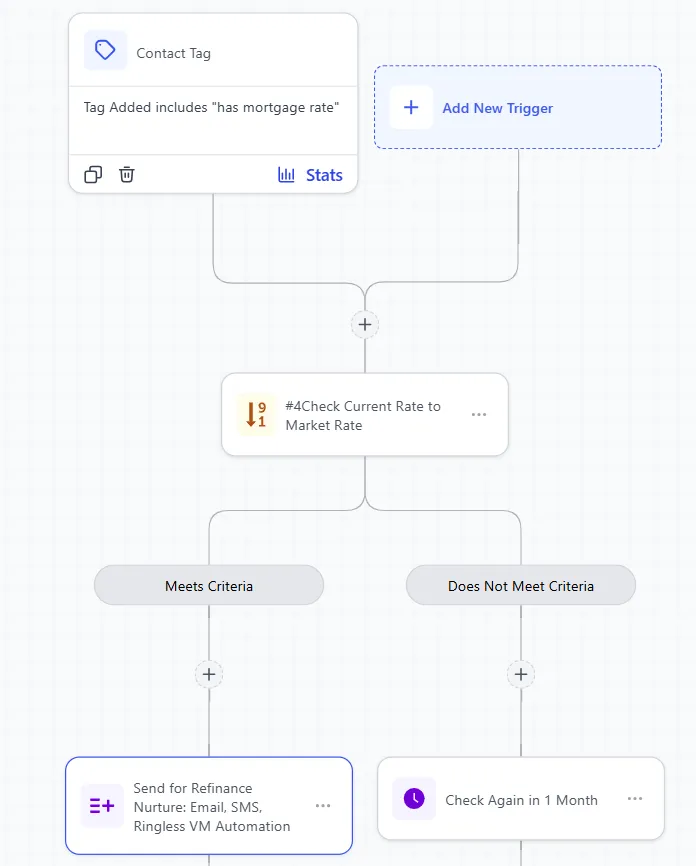
You simply provide the difference or gap between the contacts' mortgage rates and market rates and then select the market rate type (30-year conventional, FHA, 15 year conventional etc.) to use for the workflow action to qualify them. Qualified leads go to a "Meet Criteria" branch flow and the others go to a "Does not Meet Criteria flow"
1. Add to Workflow Actions
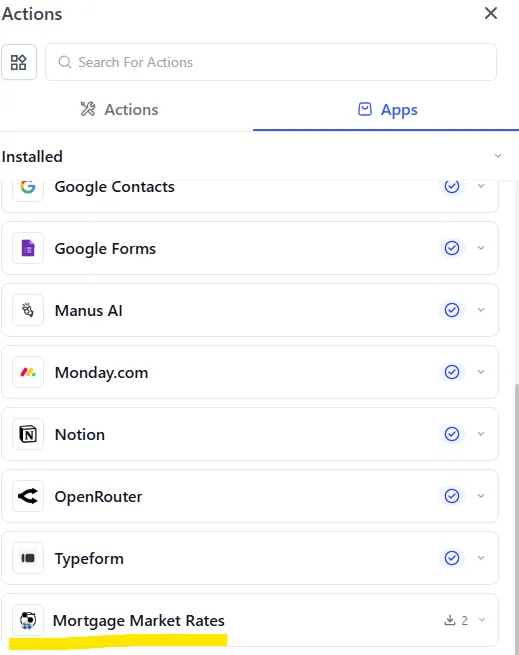
Search for "Mortgage Market Rates" within your actions or browse for it under Action Apps.
Drag it to you workflow step
2. Setup the Values
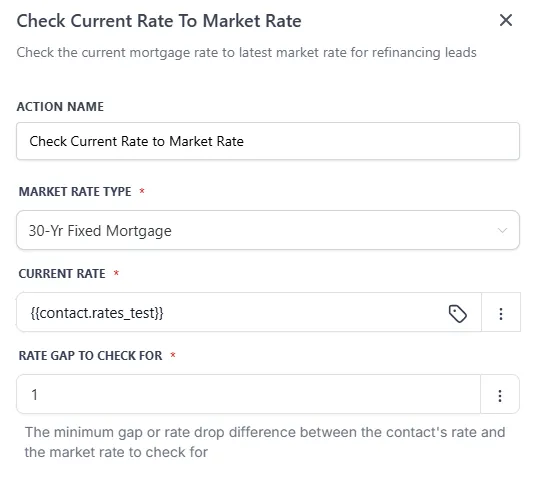
1. Select Your Market Rate Type
Market Rates Types list out the different standard market rates you can use to check against your contacts' mortgage rate. Here is the current list available:
30-Yr Fixed Mortgage: 30-Year Fixed Rate Mortgage Average in the United States - Updated Weekly
15-Yr Fixed Mortgage: 15-Year Fixed Rate Mortgage Average in the United States - Updated Weekly
30-Yr Fixed FHA Mortgage: 30-Year Fixed FHA Rate Mortgage Average in the United States - Updated Weekly
30-Yr Fixed Conforming Mortgage: 30-Year Fixed Conforming Rate Mortgage Average in the United States - Updated Weekly
30-Yr Fixed Conforming LTV <80, FICO>740: 30-Year Fixed Conforming Mortgage with Loan-to-Value Less Than or Equal to 80, FICO Score Greater Than 740 - Updated Weekly
Note: please contact us if you're looking for rates not already listed
2. Select The Current Rate
The current rate is the mortgage rate of each contact.
Ensure there is a custom field with the rate value per contact. Click the 3 dots and use the Dynamic option to select that field with contacts' rates.
Note: Please ensure the values for this custom field are all numeric to avoid potential errors
You can also provide a single rate or estimation used for all contacts by simply typing in the number value for the current rate
3. Rate Gap to Check For
The rate gap is the gap or difference to check for between contacts' rate and market rate for qualification. If the market rate is lower than the gap provided then the contact will be routed to the "Meet Criteria" flow. For examples, if the contact's rate is 10 and the gap to check for is 2, then with a market rate is 7.99 or less, the contact will be routed to "Meet Criteria" flow
Simply enter a numeric value to use as the rate gap
You can also use different or dynamic rate gaps per contact. To do so, ensure there is a custom field with the rate gap value per contact. Click the 3 dots and use the Dynamic option to select that field with contacts' rate gap.
Note: Please ensure the values for this custom field are all numeric to avoid potential errors
4. Optional: Provide an Action Name
Provide a custom action name if desired
5. Save Action
3. Add Next Steps
There are 2 outcomes or flows: "Meets Criteria" and "Does Not Meet Criteria"
Add a step at the end of "Meet Criteria" flow for all contacts that meet the criteria. For example, send contacts that meet criteria to a different workflow for email and voicemail drop outreach to nurture and convert for refinancing
Add a step at the end of "Does Not Meet Criteria" flow for all contacts that do not meet the criteria. For example, send contacts that do not meet criteria to 1 month wait step that goes back to the mortgage rate checker to recheck after a month